
Closing deals, onboarding employees, signing vendor contracts, sending sales proposals, every modern business runs on documents. But the old way of doing things (Word docs emailed back and forth, PDFs printed, signed, scanned, and re-uploaded) is slow, error-prone, and absolutely murder on your sales cycle. By the time a paper-pushing process catches up, your prospect has gone cold or signed with a competitor.
That’s exactly the gap PandaDoc is built to close. It’s an all-in-one document automation and eSignature platform that lets you create, send, sign, track, and collect payment on every business document from one cloud-based workspace. Used by more than 50,000 companies worldwide, including U-Haul, Hewlett-Packard, Bosch, and Rakuten, has become one of the most trusted names in the document management space.
In this detailed write-up, I’ll walk you through what the platform actually does, how its features perform in real-world use, what it costs, and whether it’s worth your budget in 2026. By the end, you’ll know whether PandaDoc fits your workflow goals or whether another tool might suit you better.
What Is PandaDoc?
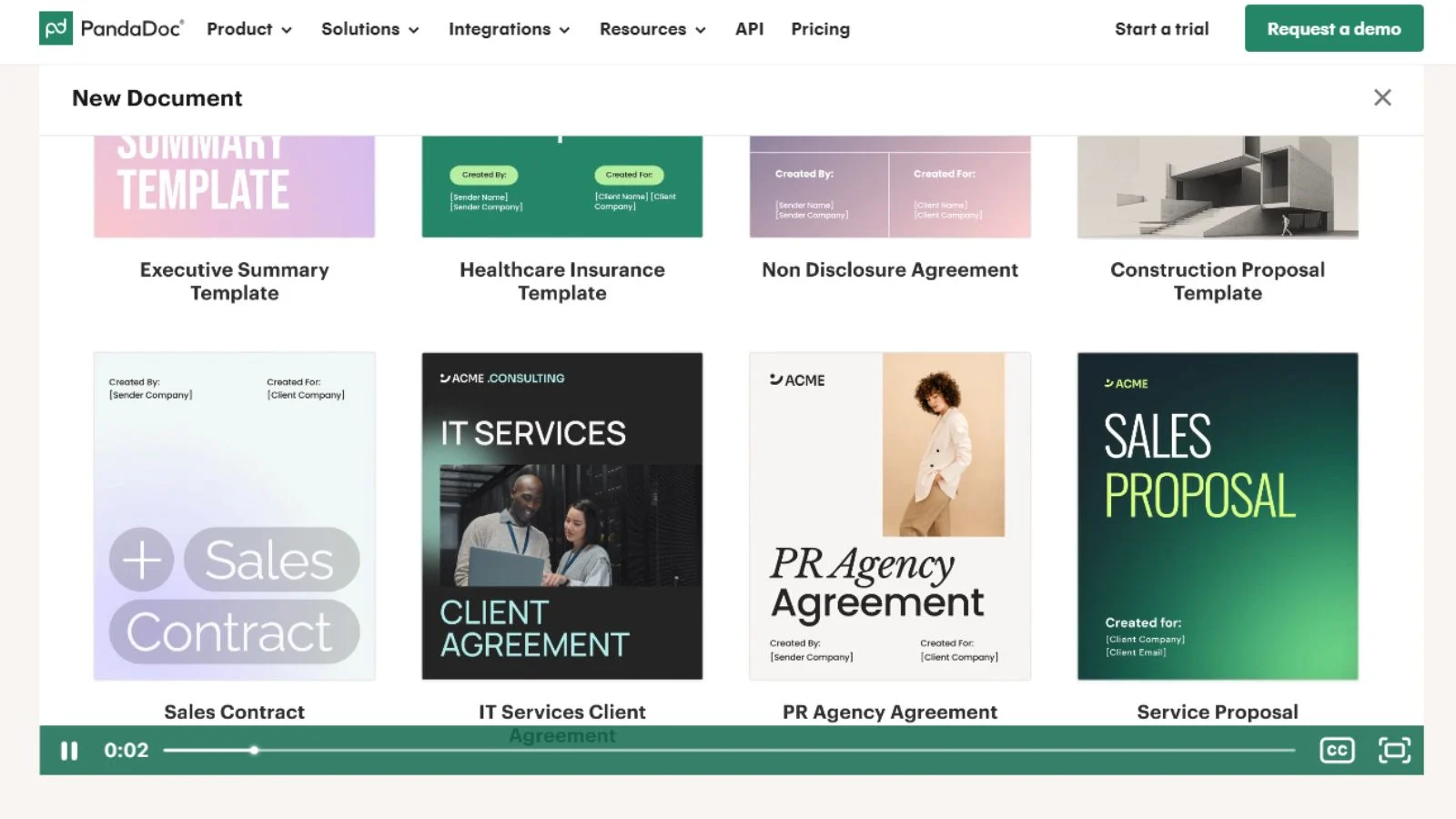
PandaDoc is a cloud-based document automation and eSignature platform built to streamline the entire document lifecycle, from creation and approval to signing and payment collection. Instead of stitching together separate tools for proposals, eSignatures, CRM integration, and payment processing, you get everything inside a single workspace.
Founded in 2013, the company has grown into a leader in the sales document and contract management space. It serves over 50,000 customers globally, holds an impressive 4.7/5 rating on G2 (3,300+ verified reviews), and supports compliance frameworks including SOC 2 Type II, GDPR, HIPAA, FERPA, ESIGN, and UETA. With over 1,000 ready-made templates, 30+ native integrations, and a powerful drag-and-drop document editor, PandaDoc is built for sales, marketing, HR, legal, and finance teams alike.
Best of all, you don’t need any technical setup. If you can drag and drop, you can build a beautiful, interactive proposal or contract in under 15 minutes.
Key Features:
Here’s a breakdown of what you get when you sign up for the platform.
1. Drag-and-Drop Document Editor:
The flagship creation tool. Build beautiful proposals, contracts, quotes, invoices, and onboarding forms using PandaDoc’s intuitive drag-and-drop editor. Add text, images, pricing tables, signature fields, video, and interactive elements in minutes, no design experience required.
2. Template Library (1,000+ Pre-Built):
A pandadoc template library with 1,000+ pre-built templates covers sales proposals, contracts, NDAs, MSAs, employment offers, statements of work, and more. Each template is fully customizable to match your brand and reusable across deals, dramatically cutting document creation time.
3. Legally Binding eSignature:
Get unlimited, legally binding electronic signatures that comply with ESIGN, UETA, eIDAS, and HIPAA. Recipients can sign on any device without creating an account, and you get a tamper-proof audit trail for every document for full legal defensibility.
4. CPQ (Configure, Price, Quote):
The built-in CPQ feature lets sales teams generate error-free, personalized quotes with auto-calculation, conditional pricing, and integrated product catalogs. Combined with HubSpot or Salesforce, it eliminates the spreadsheet-based quoting nightmare that slows down most B2B sales teams.
5. Workflow Automation & Approvals:
Set up multi-step approval workflows so documents move through the right people before being sent. Automated reminders, conditional logic, and role-based routing keep deals moving forward without manual nagging, saving hours of follow-up every week for busy ops teams.
6. Embedded Payment Collection:
Add payment widgets directly inside your documents so clients can pay the moment they sign. Native integrations with Stripe, Square, Authorize.Net, and PayPal let you collect deposits, full payments, or installment plans without sending separate invoices ever again.
7. Document Tracking & Analytics:
Get real-time notifications the moment a recipient views, comments on, or signs your document. Deep analytics show open rates, time-per-section, and engagement heatmaps so you can spot exactly where prospects hesitate and refine your messaging accordingly.
8. 30+ Native Integrations:
PandaDoc integrates natively with Salesforce, HubSpot, Pipedrive, Zoho, Monday.com, Slack, Microsoft Teams, Google Workspace, Microsoft 365, Zapier, and many more. Two-way CRM sync keeps your pipeline data clean without manual copy-paste.
PandaDoc Plans & Cost: How Much Does It Cost?
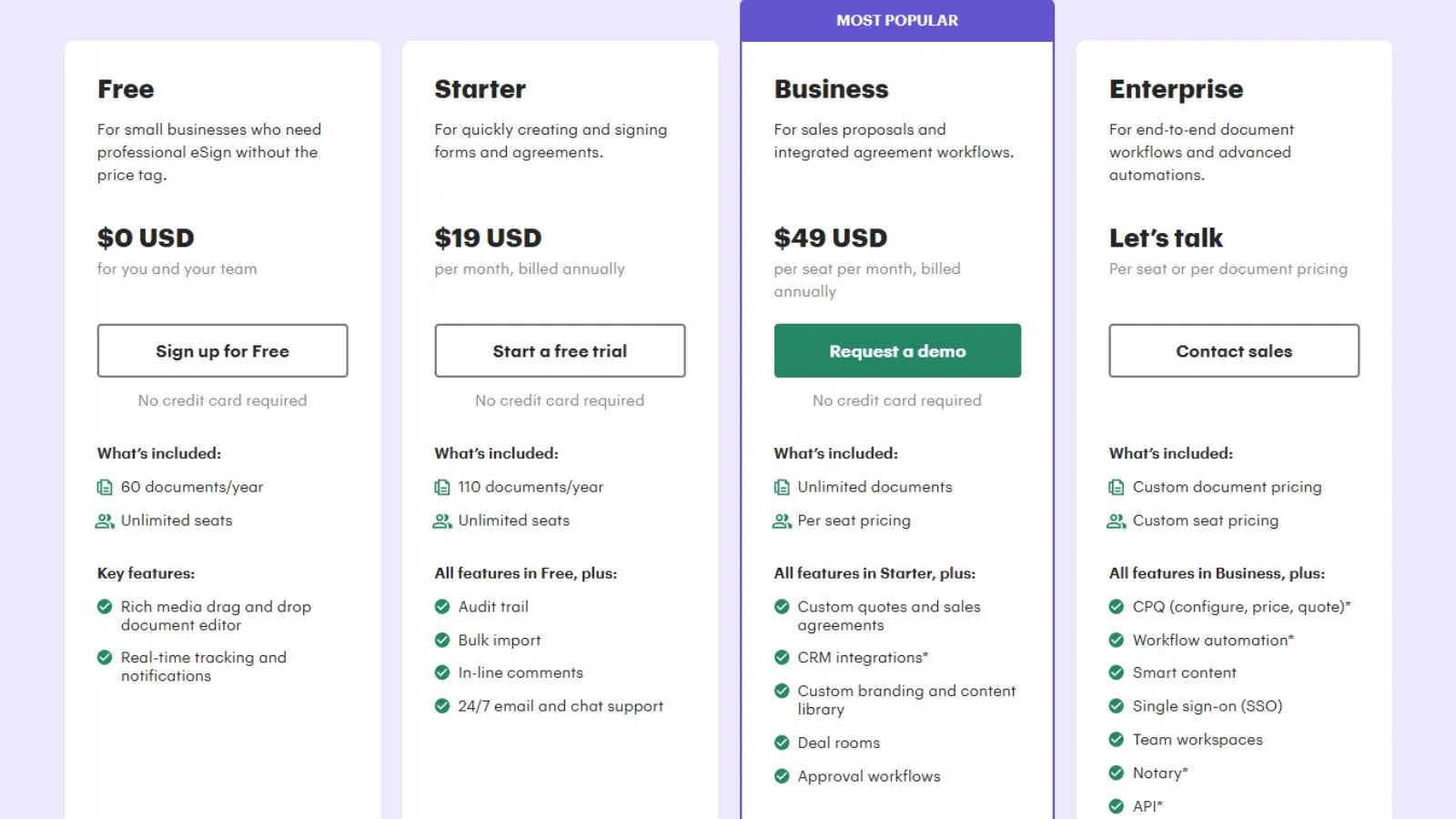
When it comes to PandaDoc pricing, the platform offers a tiered structure designed for businesses of every size. Here’s a quick snapshot:
- Free eSign Plan – $0, Unlimited eSignatures, up to 5 documents/month, mobile signing, audit trail. Great for individuals testing the waters.
- Starter – $19/user/month (annual), Unlimited document uploads, templates, drag-and-drop editor, basic analytics, and 24/7 email support. Best for small teams.
- Business – $49/user/month (annual) Everything in Starter plus CRM integrations, content library, approval workflows, custom branding, and CPQ tools. The sweet spot for growing sales teams.
- Enterprise – Custom pricing, Salesforce integration, SSO, advanced API access, dedicated success manager, and custom contracts. Built for large organizations with serious volume.
A 14-day free trial is available, and a flexible document-based pricing package is also available if you’d rather pay per document than per seat. Compared to alternatives like DocuSign, Adobe Acrobat Sign, and Proposify, the platform sits firmly in the value-for-money sweet spot for sales-focused organizations needing more than just eSignatures.
👉 Check Live PandaDoc Plans & Current Deals
Pros of Using the Platform:
Here’s what genuinely makes this tool stand out in the crowded document automation space.
- All-in-one workflow, Ccreate send, sign, track, and collect payment in one platform, no tool sprawl.
- 1,000+ templates, a massive starting library, save hours on every new proposal or contract.
- Drag-and-drop editor is genuinely simple. Non-technical team members can build polished documents in minutes.
- Real-time tracking and notifications see exactly when prospects open, view, or sign documents.
- Embedded payment collection, get paid the moment a contract is signed, no separate invoicing required.
- Strong CRM integrations, Salesforce, HubSpot, Pipedrive, and Zoho all sync natively in real time.
- User reviews are excellent, 4.7/5 on G2 across 3,300+ verified user reviews.
- Enterprise-grade compliance, SOC 2 Type II, GDPR, HIPAA, FERPA, ESIGN, and UETA all supported.
- Mobile-first signing, Recipients can sign on any device, even without a PandaDoc account.
- Excellent support team, Responsive 24/7 email support on paid plans with live chat for Business+.
Cons to Keep in Mind:
No platform is perfect. Here are a few honest downsides to know before you commit.
- Per-user pricing can scale fast. A 10-person team on Business costs roughly $490/month before add-ons.
- The free plan is limited to 5 documents/month with a cap and no templates, integrations, or analytics access.
- Signer experience could be smoother. Recipients sometimes report a less polished signing UI compared to DocuSign.
- Email deliverability issues: A minority of users report important documents landing in spam folders.
- Form field alignment quirks: Dynamic fields occasionally misalign and can be tricky to edit after placement.
- No document scheduling, you don’t schedule a document to send at a future date and time.
- Limited customization for automated emails, reminders, and follow-up emails has fewer custom options than some users would like.
What Makes It Stand Out From the Crowd?
The document automation space is crowded, but a few things genuinely set the platform apart in 2026.
First, the all-in-one workflow is genuinely rare at this price tier. Most competitors either nail eSignature (DocuSign) or document creation (Proposify), but force you to bolt on the missing pieces. PandaDoc combines creation, eSignature, payment collection, CRM sync, and analytics in a single workspace, eliminating the budget bloat of stitching together three or four separate apps that each cost $20-$40/user/month.
Second, the template depth is unusually strong. 1,000+ pre-built, professionally designed templates across sales, marketing, legal, HR, and finance use cases mean you rarely start from a blank page. For lean teams without a dedicated designer or legal reviewer, the quality bar accelerates every workflow meaningfully and reduces costly errors.
Third, the deep CRM integrations are a serious productivity moat. Two-way sync with Salesforce, HubSpot, Pipedrive, and Zoho means your CRM stays clean automatically as deals progress through the document stage. Combined with CPQ functionality and embedded payments, sales teams can move from “verbal yes” to “signed and paid” in a single session, something competing tools simply cannot match end-to-end.
Fourth, the compliance and security posture is enterprise-grade out of the box. SOC 2 Type II, GDPR, HIPAA, FERPA, ESIGN, and UETA support means the platform clears procurement reviews quickly, even at large regulated organizations. Add tamper-proof audit trails, document encryption at rest and in transit, and granular role-based permissions, and you’ve got a tool that satisfies both your sales team’s speed needs and your legal team’s risk tolerance.
Who Should Use It?
The platform is a strong fit for:
- Sales teams are sending proposals, quotes, and contracts daily and need a fast turnaround.
- Small to mid-sized businesses want professional-looking documents without hiring a designer.
- Agencies and consultancies managing client contracts, SOWs, and retainer renewals.
- HR and recruiting teams are sending offer letters, NDAs, and onboarding paperwork.
- Legal teams are centralizing contract storage, approvals, and version control.
- Finance teams managing invoices, quotes, and payment workflows.
- Customer success teams are sending renewals, upgrades, and expansion contracts.
If you only sign two or three documents a year, the free DocuSign plan may suit you better. But if document workflows are central to your operations, PandaDoc pays for itself within weeks.
How to Get Started?
Getting up and running takes about 15 minutes from signup to your first signed document.
- Sign up for the free trial using this link.
- Pick a template from the 1,000+ template library to skip the blank-page problem.
- Customize it with your branding, pricing, and content blocks using the drag-and-drop editor.
- Add recipients and signature fields in the proper signing order.
- Send the document and track in real time as it gets opened, read, and signed.
- Connect your CRM, Salesforce, HubSpot, Pand ipedrive, so deal data flows automatically.
- Add payment collection if needed via Stripe, Square, or PayPal native integrations.
Our Final Verdict:
After extensive testing and reviewing thousands of verified user reviews on G2, Capterra, and Software Advice, PandaDoc lands firmly on the positive side. It’s one of the most capable and most polished document automation platforms you can buy in 2026. The combination of an all-in-one workflow, massive template library, native CRM integrations, and embedded payment collection makes it genuinely hard to beat for sales-driven and document-heavy teams.
Yes, the per-user model can climb quickly for larger teams, and the free plan is more of a sampler than a real working tool. But for the value delivered, hours saved on every document, faster sales cycles, and measurable revenue impact, those friction points are minor compared to the operational lift for any team treating documents as a strategic asset rather than an admin chore.
If you’re still unsure about which plan suits your team, start with the 14-day free trial. You’ll see the value within your first three documents.
👉 Start Your Free PandaDoc Trial Today
Conclusion:
Document workflows aren’t getting simpler in 2026, but the right platform can dramatically reduce your sales cycle and operational overhead. If you want a true all-in-one document automation tool with eSignature, CPQ, payment collection, CRM integration, and powerful analytics, PandaDoc is one of the smartest investments you can make this year. The 1,000+ template library, drag-and-drop editor, and deep workflow automation together make it a near-complete package for any business treating documents as core to growth.
FAQs:
Q1. Is PandaDoc really free?
Ans: Yes. The Free eSign plan supports unlimited eSignatures with up to 5 documents/month.
Q2. Are eSignatures legally binding?
Ans: Yes. They comply with ESIGN, UETA, eIDAS, and HIPAA standards globally.
Q3. Does it integrate with my CRM?
Ans: Yes. Salesforce, HubSpot, Pipedrive, Zoho, and 30+ other tools sync natively.
Q4. Can I collect payments?
Ans: Yes. Stripe, Square, Authorize.Net, and PayPal payment widgets work inside documents.
Q5. Is there a free trial?
Ans: Yes. A 14-day free trial is available with full access to paid features and no credit card required.