Running payroll shouldn’t feel like a second job, but for many small business owners, managing wages, taxes, benefits, and compliance can quickly become overwhelming. That’s where Gusto comes in, a cloud-based platform designed to simplify payroll and HR tasks for teams of all sizes.
In this extensive Gusto review, we’ll explore how the software performs in real-world use, what features it offers, where it shines, and where it might fall short, so you can decide whether it’s the right solution for your business.
What Is Gusto? (Overview)
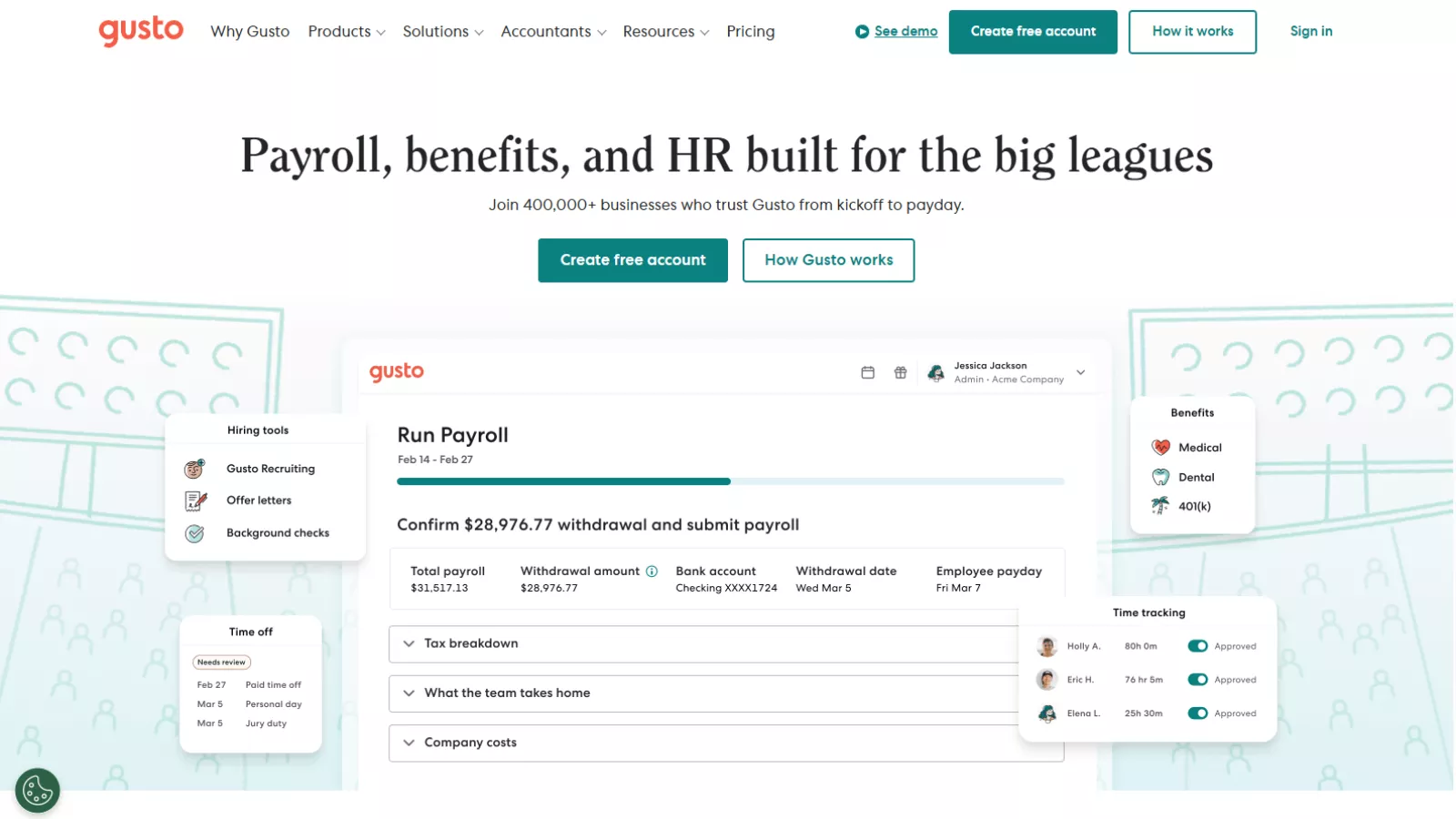
At its core, Gusto payroll software is a comprehensive HR and payroll platform built to help businesses handle workforce management without manual headaches. Gusto combines payroll processing, benefits administration, time tracking, hiring tools, and compliance support into one unified system — all accessible through a cloud-based dashboard.
Whether you’re paying yourself as a solopreneur or running payroll for a team across multiple states, Gusto aims to make routine tasks faster and less error-prone. The platform supports everything from automated tax filings and direct deposit to benefits and PTO tracking, and it integrates with many popular accounting and HR tools.
Gusto’s interface is designed to be intuitive, even for users with no HR or accounting background. That’s a big reason why it has become one of the most popular payroll solutions for small and growing businesses in the United States.
Gusto Payroll Software: Key Features Explained
1. Full-Service Payroll
The central pillar of Gusto is its payroll functionality. It automates the entire payroll process, including:
- Payroll calculations for employees and contractors
- Automatic federal, state, and local tax calculations and filings
- Generation of W-2s and 1099s
- Unlimited payroll runs each month at no extra cost
Unlike some competitors that charge per payroll run, Gusto allows you to process as many payrolls as you need, correct mistakes, or issue off-cycle payments without additional fees. It even offers scheduling automation (AutoPilot) to run payroll on a set cadence without extra clicks.
This level of automation helps business owners reclaim time otherwise spent wrestling with spreadsheets and tax forms — and that’s precisely where Gusto first earns its reputation.
2. Tax and Compliance Management
One of the hardest parts of payroll is staying compliant with ever-changing tax laws. Gusto handles:
- Tax calculations and filings for all covered jurisdictions
- Employer tax payments
- Year-end forms like W-2s and 1099s
- State tax registration support
For many users, the peace of mind that comes from knowing taxes are being managed automatically is one of the biggest selling points of Gusto. Businesses don’t need to memorize tax codes or worry about penalties — Gusto does the heavy lifting.
3. Time Tracking and PTO
Tracking hours, PTO, and attendance is essential for accurate payroll, and Gusto integrates these features directly into its platform:
- Employees and contractors can clock in and out via the Gusto mobile app or browser
- PTO requests and balances are tracked and visible in real time
- Approved hours feed directly into payroll calculations without manual entry
Rather than using a separate time tracking tool, this integration reduces errors and streamlines payroll runs. For companies with hourly staff or complex schedules, it’s a significant efficiency gain.
4. Benefits Administration
Another strong area for Gusto is employee benefits. The platform supports:
- Health insurance (medical, dental, vision)
- 401(k) retirement plans
- Health Savings Accounts (HSA) and Flexible Spending Accounts (FSA)
- Commuter benefits
- Workers’ compensation management
Benefits administration is tied directly to payroll, so deductions and contributions are handled seamlessly. If you choose Gusto as your broker of record, the administration comes at no additional cost beyond premiums.
This integration is a huge plus for small businesses that want to offer competitive perks without juggling multiple systems.
5. Hiring and Onboarding Tools
Gusto includes features that support early HR workflows:
- Digital offer letters
- New hire reporting
- Employee self-onboarding (with e-signatures for forms like I-9 and W-4)
- Checklists to guide new employees through setup
It’s not a full applicant tracking system (ATS), but most small teams find these tools sufficient for basic hiring needs. Gusto’s self-service onboarding reduces errors and administrative burden — employees enter their own information directly.
6. Integrations with Other Tools
Gusto doesn’t exist in a vacuum — it plays well with other software systems:
- QuickBooks and Xero (accounting sync)
- Time and attendance tools like Homebase or When I Work
- Expense management tools like Expensify
- Performance and HR platforms like Lattice and 15Five
These integrations mean payroll data, hours, and financials can flow smoothly between systems without manual exporting. For business owners who rely on multiple platforms, that connectivity reduces reconciliation work and surfaces errors.
Gusto Pricing: How Much Does It Cost in 2026?
One of the questions potential users always ask is: “What will Gusto actually cost me?” The pricing model is straightforward but varies based on features needed and team size.
Gusto Pricing Tiers
Here’s a simplified breakdown:
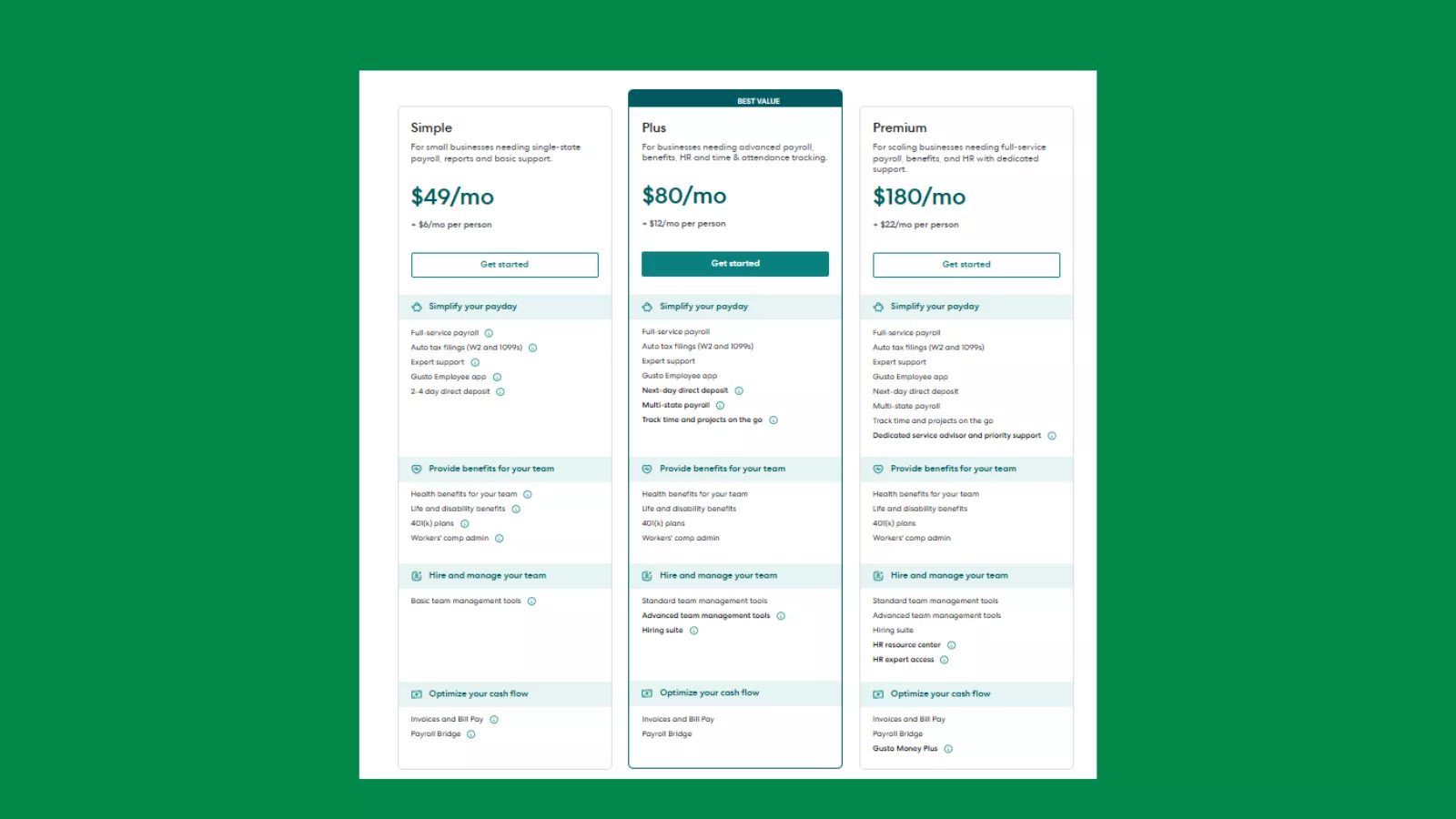
Simple Plan – $49/month base + $6 per person
The Simple plan is designed for small businesses that want payroll done correctly without extra complexity. It covers the essentials like running payroll, filing federal and state taxes, and handling W-2s and 1099s automatically. Employees get access to the Gusto app, and direct deposits are processed quickly. This plan also includes basic health benefits administration and workers’ compensation support. In short, it’s a good fit if your team is small, operates in a single state, and you mainly want payroll to “just work” without spending time managing it.
Plus Plan – $80/month base + $12 per person
The Plus plan is meant for growing businesses that need more flexibility and visibility. Along with everything in the Simple plan, it supports multi-state payroll, which is useful if your team works across different locations. It also adds time and attendance tracking, project tracking, and stronger team management tools. Hiring becomes easier with built-in onboarding features, and payroll can sync better with how your employees actually work day to day. This tier works well for companies that are scaling and want payroll, time tracking, and people management to live in one system.
Premium Plan – $180/month base + $22 per person
The Premium plan is for businesses that want full-service payroll and hands-on HR support. It includes all Plus features but adds a dedicated payroll and HR support team, priority customer service, and access to certified HR experts for compliance and people-related guidance.
This plan also offers deeper cash-flow tools and advanced HR resources, making it suitable for companies with larger teams or more complex HR needs. If you want expert help available and don’t want to worry about compliance or HR decisions, this is the most comprehensive option Gusto offers.
For many small businesses, the Plus plan strikes the best balance between features and cost. By comparison, Simple is suited for basic payroll, and Premium is more fitting for larger teams or organizations with complex HR needs.
Value Perspective
While the upfront pricing might seem higher than some legacy payroll tools, the number of features included — especially automated filings, payroll runs without limit, integrated benefits, and time tracking — often offsets the cost in terms of hours saved and errors avoided.
Gusto Review: Pros and Why Users Like It
Here’s what Gusto review users and experts consistently praise:
✔ Very Easy to Use
Gusto’s interface is intuitive and beginner-friendly. Business owners without HR or accounting experience can run payroll, manage benefits, and handle tax forms with minimal training.
✔ Comprehensive Feature Set
It’s more than payroll — benefits administration, PTO, time tracking, onboarding, and compliance workflows are all built in.
✔ Consistent Integrations
Syncing payroll data with accounting and HR tools saves time and reduces errors.
✔ Unlimited Payroll Runs
You can process payroll any number of times per month without extra fees — a standout benefit compared to legacy competitors.
✔ Helpful Employee Self-Service
Workers can access pay stubs, tax forms, PTO details, and benefits options directly — reducing admin questions for business owners.
Gusto Review: Cons and Limitations
No software is perfect, and gusto payroll software is no exception. Here are some common drawbacks reported by users:
✘ Customer Support Variability
Some users report inconsistent experiences with support responsiveness, especially on lower plans. Response time and quality can vary depending on the complexity of the issue.
✘ Pricing at Scale
As employee counts grow, the per-person fee can add up quickly. For mid-sized teams, costs may outpace simpler payroll or HR software alternatives.
✘ Not Fully Global
While Gusto supports international contractor payments and some employer-of-record options, it is still primarily focused on U.S. payroll and may lack full global payroll capabilities.
✘ Advanced HR Features Limited
For companies that need deep performance management, succession planning, or sophisticated HR analytics, Gusto’s tools may feel basic compared to full HR suites.
User Feedback: What Real Customers Say
Customer reviews paint a mixed but generally positive picture:
- Many small business owners say Gusto reduces payroll processing time dramatically and eliminates manual tax filings.
- Some customers highlight it as one of the best payroll solutions for startups and SMBs thanks to ease of use.
- However, there are complaints on review sites regarding pricing increases and occasional support challenges.
This aligns with the general consensus — Gusto is loved for its core payroll capabilities and simplicity but isn’t perfect for every team, especially those with complex or international needs.
Gusto vs. Alternatives
When evaluating payroll software, it’s worth comparing Gusto against other tools:
- QuickBooks Payroll – Great if you already use QuickBooks accounting, but Gusto often has wider HR features.
- ADP – Enterprise-grade payroll and HR, but more expensive and complex.
- Rippling – Strong global payroll and IT management, ideal for tech-heavy teams.
- BambooHR + Payroll Add-ons – A richer HR experience if you need advanced people management.
Your choice depends on whether you prioritize payroll simplicity, global reach, deep HR workflows, or advanced analytics.
Also Read
QuickBooks Online Review: Why Small Businesses Still Rely on It?
Who Should Use Gusto? (Best Fit)
Gusto most benefits:
- Small to mid-size U.S. businesses
- Teams that value easing payroll workload
- Employers who want integrated benefits and PTO tracking
- Organizations with hourly employees or mixed contractor and W-2 staff
It’s especially strong when payroll and basic HR tasks are a core pain point, and you’re looking to reduce manual effort.
Real-World Use Cases: How Businesses Actually Use Gusto

For a small startup with around five to ten employees, Gusto often becomes the first payroll system they rely on. Founders usually don’t have payroll experience, and that’s where Gusto helps by guiding them through setup step by step. Once employee details and tax information are added, payroll runs automatically on schedule. Taxes are filed in the background, pay stubs are generated, and employees get paid on time without the founder having to manually calculate anything. For early-stage teams, this removes the stress of payroll and lets them focus on growing the business.
For a growing company hiring across multiple states, Gusto payroll software helps manage the added complexity without turning payroll into a full-time job. As soon as a new employee is added in a different state, Gusto applies the correct state tax rules and handles filings accordingly. Payroll stays consistent even as the team expands geographically, which is especially useful for remote or hybrid companies that don’t operate from a single location.
For founders managing payroll and employee benefits without an HR team, Gusto acts as a central system for both. Health benefits, workers’ compensation, and payroll all live in one place, reducing the need to coordinate with multiple providers. Employees can access their own pay details and tax documents, which cuts down on admin work. In this setup, Gusto becomes less of a payroll tool and more of a support system that helps small teams stay organized and compliant without hiring dedicated HR staff.
Final Verdict
After evaluating Gusto payroll software across features, pricing, ease of use, integrations, and customer feedback, the conclusion is clear: Gusto remains one of the leading payroll and HR platforms for small and growing businesses in 2026.
It has a powerful blend of automation and simplicity, and while it isn’t perfect for every use case, it consistently delivers value by saving time, reducing errors, and centralizing HR tasks in one place. If your business needs payroll that just works without manual tax filings and spreadsheets, Gusto deserves serious consideration.
FAQs
Is Gusto suitable for businesses with international employees?
Gusto is built primarily for U.S.-based businesses. While it works well for paying U.S. employees and contractors, it doesn’t support international payroll or global compliance. If your team includes workers outside the U.S., you may need a separate global payroll or contractor payment tool alongside Gusto.
Can Gusto handle both salaried and hourly employees together?
Yes, Gusto payroll software supports both salaried and hourly workers within the same account. Hourly employees can track time through integrated time-tracking tools (depending on the plan), while salaried employees are paid automatically based on set schedules, making mixed teams easy to manage.
How easy is it to switch to Gusto from another payroll provider?
Switching to Gusto is generally straightforward. Gusto helps import employee details, tax information, and payroll history from your previous provider. Most businesses can complete the transition without disrupting payroll cycles, especially if the switch is planned between pay periods.
Does Gusto handle payroll corrections or mistakes?
Yes, if a payroll mistake happens, Gusto allows you to correct errors such as missed hours, incorrect pay amounts, or wrong deductions. The platform also helps adjust tax filings when required, reducing the stress of fixing payroll-related issues.